Features

Everything it does, by the job it does

Search is the first step. The work that loses bids happens after you have found the notice. Each feature below carries the cheapest plan that has it; one with no plan comes with every account. What each plan costs.

01

Find it

Open federal notices from SAM.gov, filtered by NAICS, agency and set-aside, plus Grants.gov grants, DoD SBIR and STTR topics, DLA DIBBS requests for quotation and bids from eight state and local portals. An alert that catches far too much, or nothing at all, says so.

  • Search and save

    Type what you are looking for in plain words, or narrow by NAICS, set-aside, agency, state and date with a count beside every choice. Sort by deadline, and create a pursuit from any notice. Free forever.

  • Smart alertsEssential

    Save a search. Get an email and a push notification when a matching contract is found, and a warning when the alert itself is catching far too much or nothing at all.

  • Your matchesEssential

    What your alerts caught in the last two weeks that is still open and not already a pursuit, closing soonest first, narrowed by the alert that caught each one, set-aside, closing date or department. Up to sixty are listed, with the total count.

  • Deadline calendar

    The deadlines on your pursuits, or the next 300 notices to close, grouped by day, so nothing slips. Free forever.

  • Officer searchProfessional

    Find the contracting officers who buy what you sell, see everything they are running right now, and reach them directly.

  • Sources Sought responsesEssential

    A draft answer to a Sources Sought notice, from the agency’s own questions and your company profile, because answering is how a small firm shapes the set-aside decision.

  • Agency forecastsProfessional

    What agencies expect to buy before a notice exists, matched to your trades and in the morning email, with the notice it became when it posts.
02

Read it

The attachments, not the summary. The shall, must and required lines that decide whether a bid is accepted, each with the sentence it came from, and the disqualifying ones marked. Then the proposal: an outline from the checklist, and on Professional a first draft from your own record.

  • AI document reviewEssential

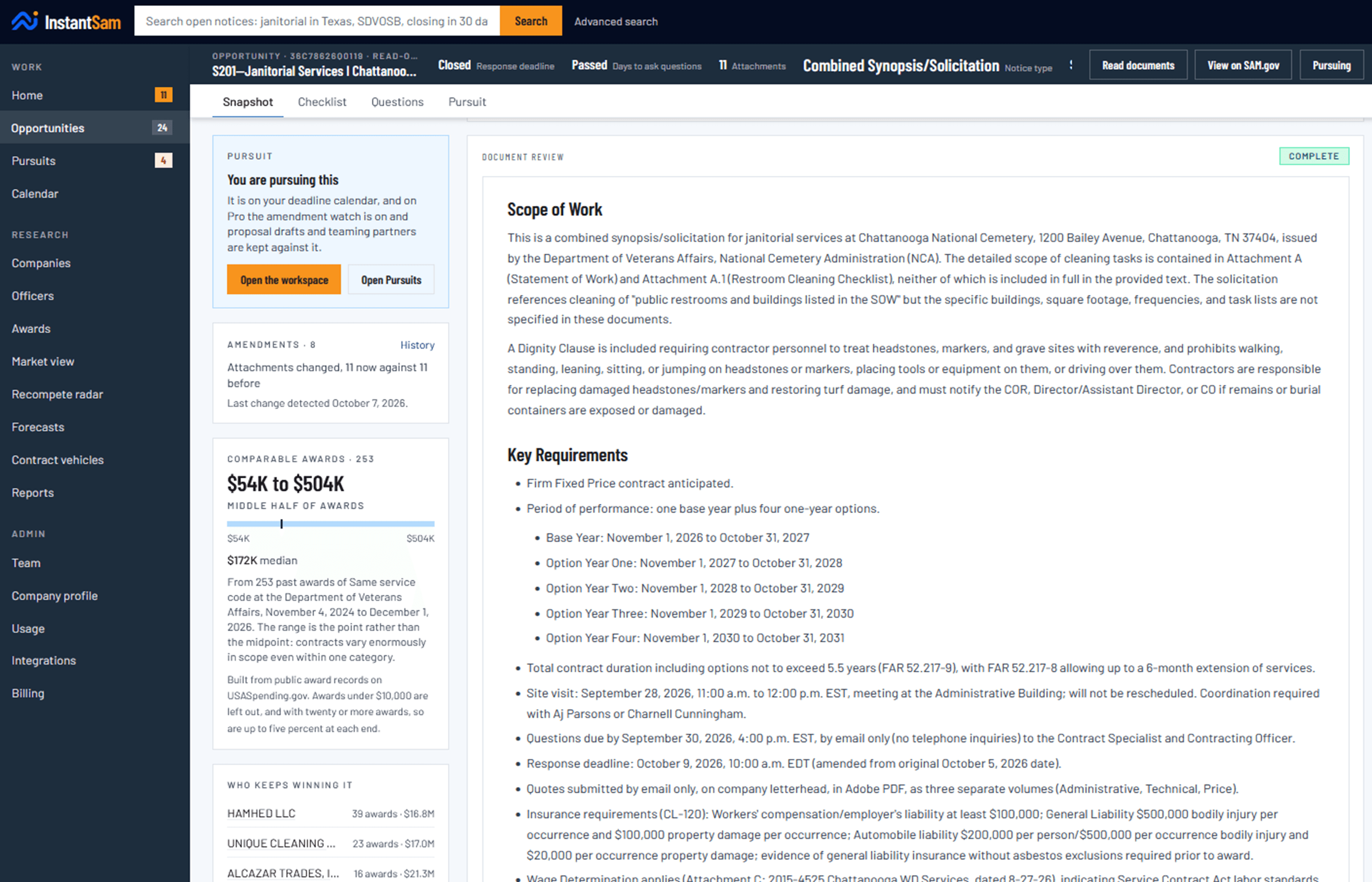
    Downloads up to fifteen attachments a notice, reads the PDFs, Word documents and spreadsheets, and returns scope of work, mandatory requirements, submission instructions, evaluation criteria, risks and red flags, and says which attachments it read in full, in part or not at all.

  • Compliance checklistEssential

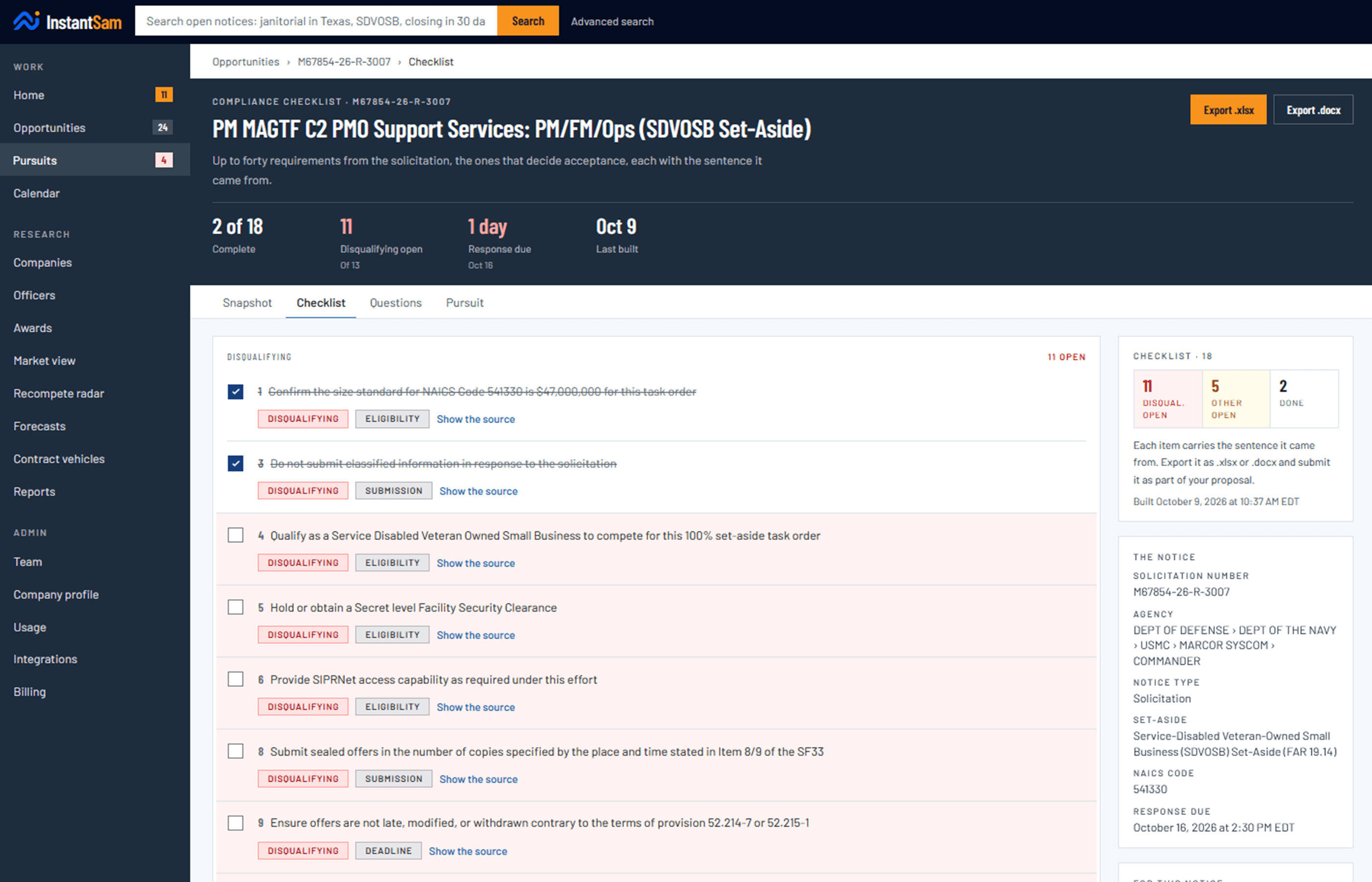
    Up to forty “shall submit”, “must include” and “is required to” lines that decide whether a bid is accepted, each with the sentence it came from. Items that would disqualify a proposal are marked as such. Part of the notice’s document review: building it after the review spends nothing more.

  • AI bid assistantEssential

    Ask anything about an opportunity and get answers grounded strictly in the notice itself. If it is not in the solicitation, it says so.

  • What work like this costsProfessional

    What the government has actually paid for comparable work, from public award data, with the sample size shown so you can judge it.

  • Proposal outline and drafting guidesEssential

    The checklist arranged into the sections of a proposal, each read as the writer: what it must prove, quoted from the solicitation, how it is scored, and a Word skeleton with a placeholder for every answer.

  • AI proposal draftsProfessional

    Each section drafted from what it must answer, quoted from the solicitation, and from your own company record, never an invented fact: a note in brackets marks anything only you can supply. 5 a month.

  • Submission packageEssential

    The forms, volumes and attachments the solicitation demands, each with its source sentence and the file that answers it, and a zip in the agency’s order with a manifest of what is missing.

03

Decide it

Strong match, worth a look, or probably not, traceable to your own profile. Amendment watch reports the day a deadline moves.

  • Home

    The app and the website open on what changed overnight, what closes this week, and what still needs a result recorded, most urgent first.

  • Amendment watchEssential

    Deadlines that move, set-asides that change, notices that are canceled, and attachments that appear after you read the first version.

  • Daily digestEssential

    One email each morning with what needs you today, and silence on the days nothing does.

  • Certification remindersEssential

    Warned at sixty, thirty, fourteen, seven and one day before an 8(a), WOSB, HUBZone or SDVOSB status expires.

  • Fit assessmentEssential

    Every solicitation opens with strong match, worth a look, or probably not, and the reasons under it, each one traceable to your codes, your status or the clock. The same band sits on every row of a search, your matches and your pursuits.

  • Proposal filesEssential

    Every draft kept against the bid it belongs to, with versions, so the current one is never in doubt and the older ones are a tap away. Private to your team; the security page says where files are kept.

  • Price to winEssential

    The hourly ceiling rates the government has already accepted for the labor categories the solicitation names, with the rows behind each figure and an estimate built from them.

  • Calendar feedEssential

    Every deadline, question cutoff, next action and certification expiry in Google Calendar, Outlook or Apple Calendar, kept current on its own.

04

Learn from it

Who won, what they were paid, and what work like this normally costs, including on the bids you lost.

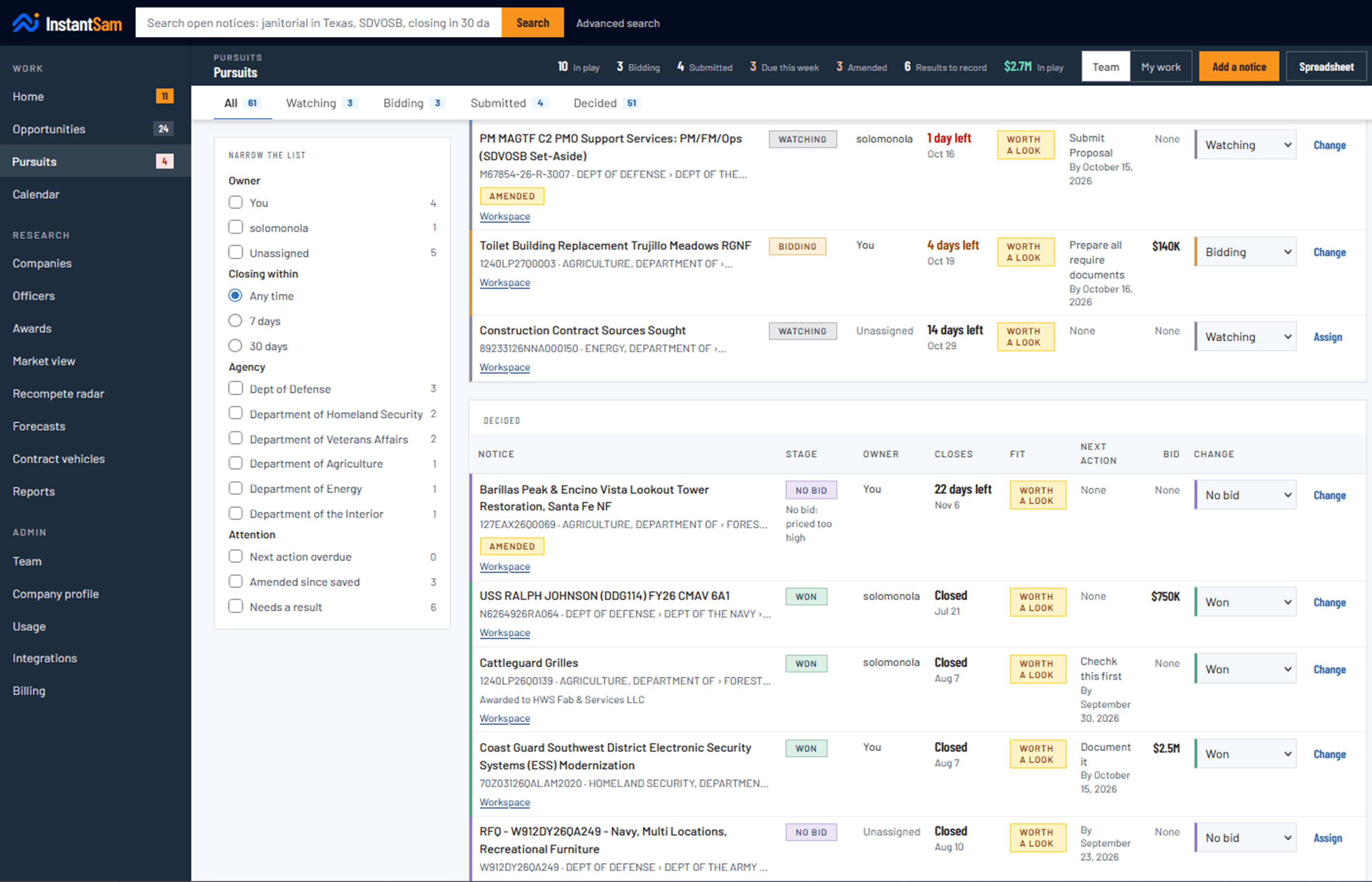
  • Pursuits

    Move a pursuit from Watching to Bidding to Submitted, then Won, Lost or No bid, with the reason in one tap. What is waiting on you sorts to the top, and the board narrows by owner, agency, closing date or what needs attention.

  • Bid capture

    Record what you bid when you submit it, so the number is there when the outcome arrives.

  • Award outcomes

    Who won, what they were paid, and how that compares to what you bid.

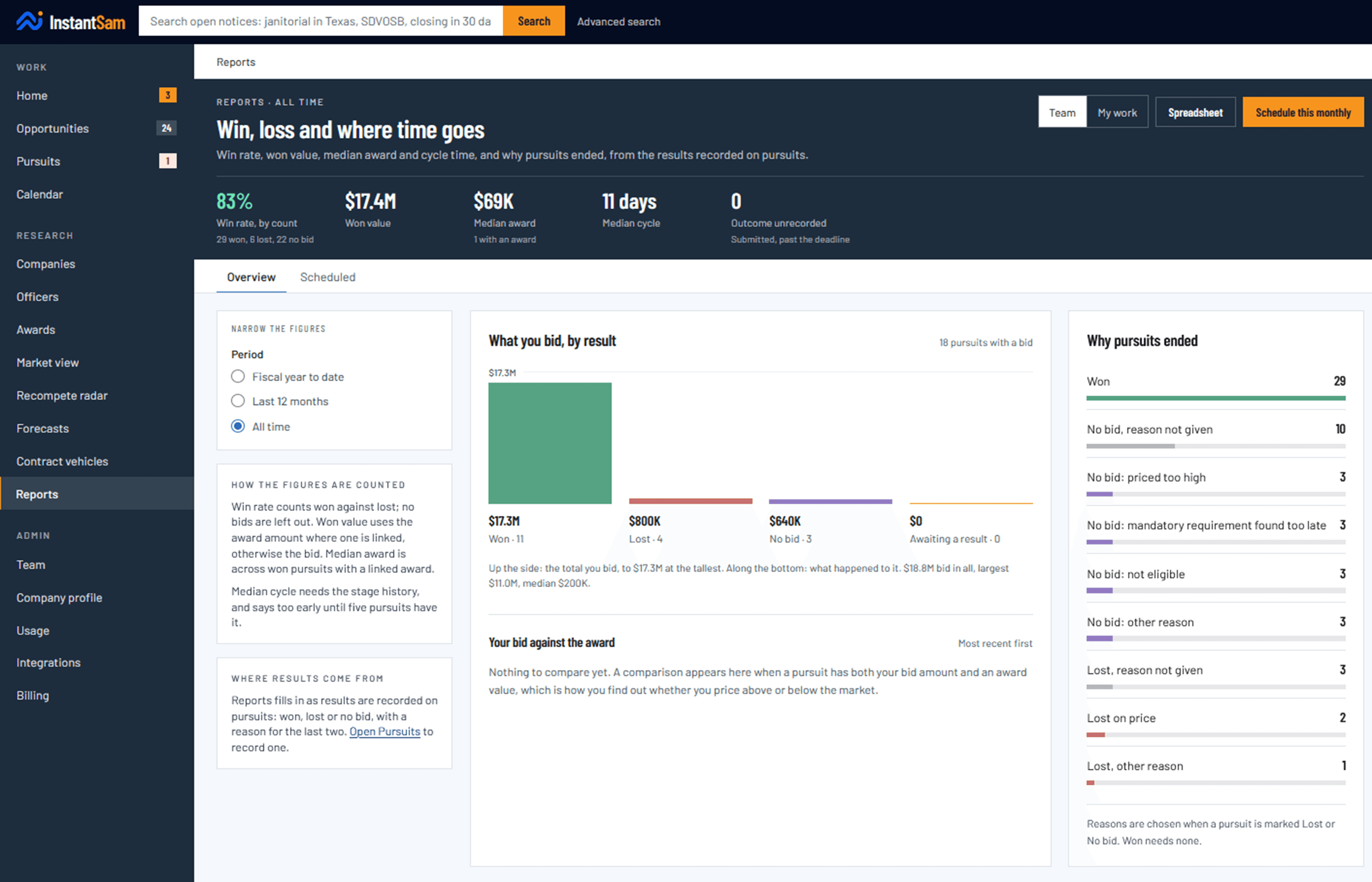
  • ReportsEssential

    Win rate, won value, median award and cycle time, and why pursuits ended, counted from the results you record. For your whole team or just your own work, with a summary by email each week or month.

  • How crowded it isProfessional

    How many offers this agency usually gets in your trade, how often it awards to the only bidder, how much it sets aside, and who keeps winning.

  • Business searchProfessional

    Look up any federal contractor. Registration status, location, NAICS codes.

  • Teaming partnersProfessional

    Save the firms already winning work like yours, keep what you know about them, and put them on a bid as prime, sub or still talking.

  • Recompete RadarProfessional

    Contracts in your trade and your states that end in six to eighteen months, with the incumbent and what they were paid. When a contract ends the work usually does not, and large firms pay a capture team to track exactly this.

  • Integrations and single sign-onPremier

    A read-only API key for your notices, pursuits, matches and reports, webhooks that post to your own systems within the hour, and sign-in through your company’s Okta, Microsoft Entra or Google Workspace.

And then

Reading it is not the end of it

A solicitation is not a document, it is a moving target. It gets amended, it gets canceled, the deadline jumps forward, and eventually somebody wins it. InstantSam follows all of that and tells you.

Sitting down

It reads the attachments, on a screen big enough to work on

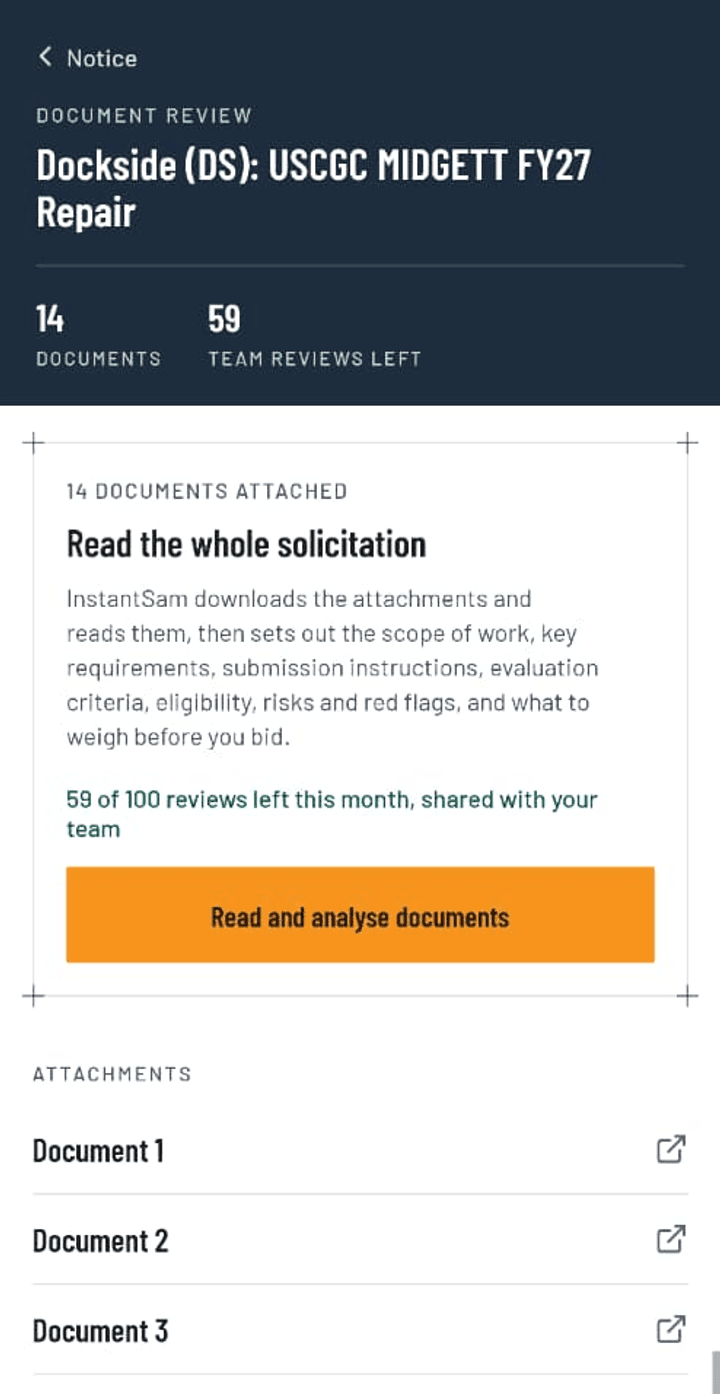
A solicitation keeps its detail in the attachments. InstantSam downloads up to fifteen of them, reads them, and sets out the scope of work, the mandatory requirements, how to submit, how you will be scored, and what would disqualify you.

The same review is on your phone, so you can run it at a desk and read it again on the way to a meeting. The compliance checklist quotes the sentence behind each item, so you can check it rather than trust it.

A document review on the website, setting out the scope of work

On the website. A real Army fire alarm solicitation

Before you submit

A checklist of what decides acceptance, with the ones that disqualify you marked

Up to forty shall submit, must include and is required to lines that decide acceptance, each pulled out of the solicitation with its own sentence. The ones that get a bid thrown out unread sit at the top, marked.

Tick them off as a team, see who did what, and export the whole thing as a spreadsheet or a Word document to submit with the proposal.

A compliance checklist on the website, disqualifying requirements first

On the website. Export it as a spreadsheet or a Word document

Every result

It shows where your bids really end

A lost bid only teaches you something if somebody writes down why. When you mark a pursuit Lost or No bid, InstantSam asks for the reason in one tap: price, technical score, past performance, a requirement found too late.

Reports counts it all: win rate, won value, median award, how long bids take, and why pursuits ended, for your whole team or just your own work. On the website the same report can arrive by email every Monday, with a spreadsheet attached. While results are still unrecorded, it says the numbers are provisional instead of flattering you.

InstantSam Reports on the website: win rate, won value, the pipeline by stage and where pursuits drop out

On the website. Sample data

Both screens

One account, the website and your phone

The same pursuits, the same reviews, the same team. Sign up on either one. Some features reach the website before the phone app.

On the website

The work you do sitting down

Reading a review against the attachments, working a compliance checklist, drafting the questions for the contracting officer, managing the pursuits board, and Reports.

The pursuits board on the website, with stages, owners and target bids

On your phone

The work that finds you

An alert when something matching is found, the amendment that moved a deadline, the morning list, a review read again on the way to a meeting, and recording a result between meetings.

Download on the App StoreGet it on Google Play
A notice's document review in the InstantSam phone app, with its attachments listed

Your next opportunity starts here

Read your next solicitation tonight

3 free document reviews. No card, no call, and the price is already on the pricing page.

  1. 01

    Create your free account

    An email and a password. No card, and nothing to cancel.

  2. 02

    Open a solicitation in your trade

    Search open federal notices by NAICS code, agency or set-aside.

  3. 03

    Have the attachments read for you

    Scope, mandatory requirements, how it is evaluated and what would disqualify you, in plain words.

Start free

No card required. 3 document reviews free.

Take another look at the productSee what it costs